Welcome to Persian Music Scales!
Explore Persian musical scales with interactive circles: discover intervals and microtones, transpose and listen to pitch models, and try the tuner and audio analysis tools with your own music.
Start with the open lesson below, or choose any other topic to explore at your own pace.
Your first steps
- Open Scales and choose Shur or another available scale in the selector.
- Read the pitches on the linked circles; rotate the diatonic circle to transpose the displayed model.
- Use Play Scale to hear the modeled notes, or open Tuner to check a sounded pitch.
- Open the microphone or Analyze Track when you want to compare a recorded melody with the scale models.
Navigation and installation
Use the fixed bottom menu to switch between Scales, Tuner, Guide and About. Select EN, FR or فارسی in the page header; your selection follows you between sections.
On a phone browser, use the installation invitation to find the appropriate Add to Home Screen instructions or supported browser prompt. On a compatible desktop browser, look for the installation control in the address bar or browser menu. An installed PWA may open in its own window.
Explore the musical circles
Reading the two circles
The display has two linked circles:
-
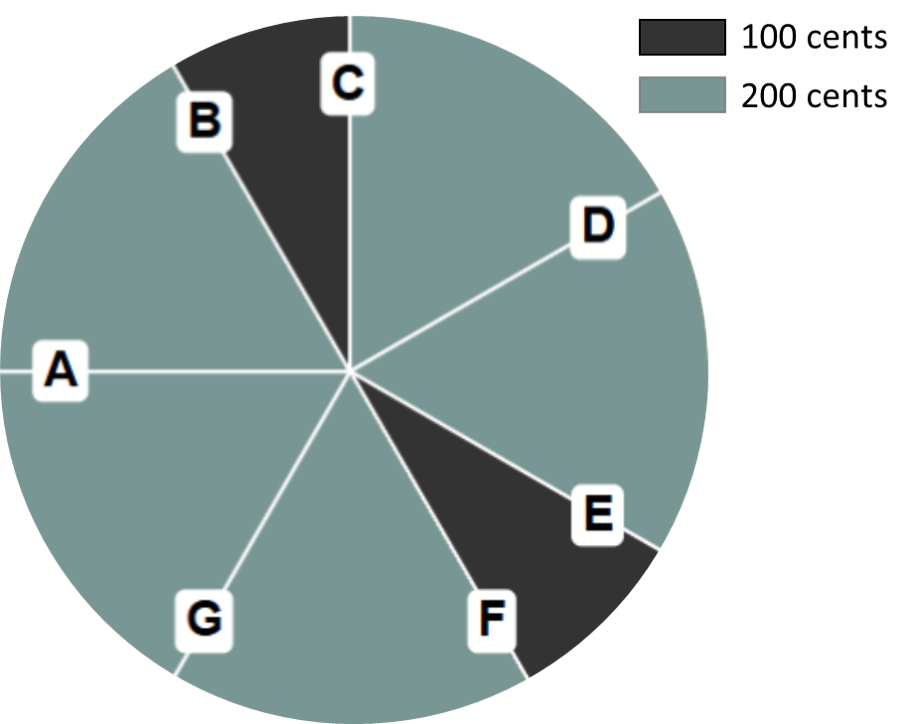
Diatonic Circle: Shows the diatonic reference notes. Rotate this circle to transpose the model while keeping its interval pattern unchanged.
-
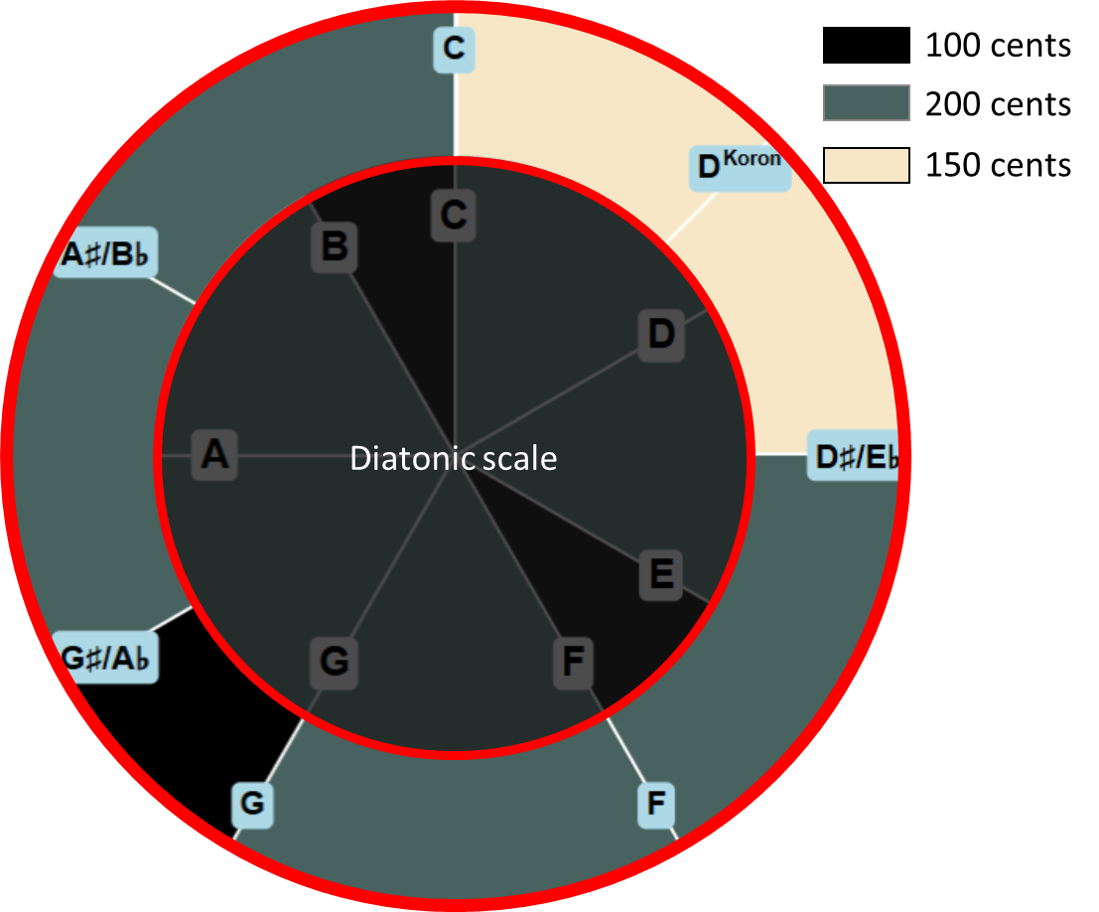
Persian Scales Circle: Shows the degrees and intervals of the selected Persian pitch model. Its reference note is not necessarily the shahed or the finalis of the dastgah.
Reference note and modal functions
The note at 12 o’clock is the reference for the displayed pitch model. It is not automatically the shahed (a focal note) or the finalis (the note of melodic closure).
- Find the note at the top of the Persian scales circle.
- This is the reference note for the current display.
- Rotate the diatonic circle to explore other reference pitches. Where a modal function has been assigned from a documented source, ★ marks the shahed and ◆ the finalis. You can show or hide these symbols. Open "About these notes" to see the sources, provisional assignments, and limitations. If no symbol appears, that function has not been assigned in the current model; the note itself is not missing.
Example
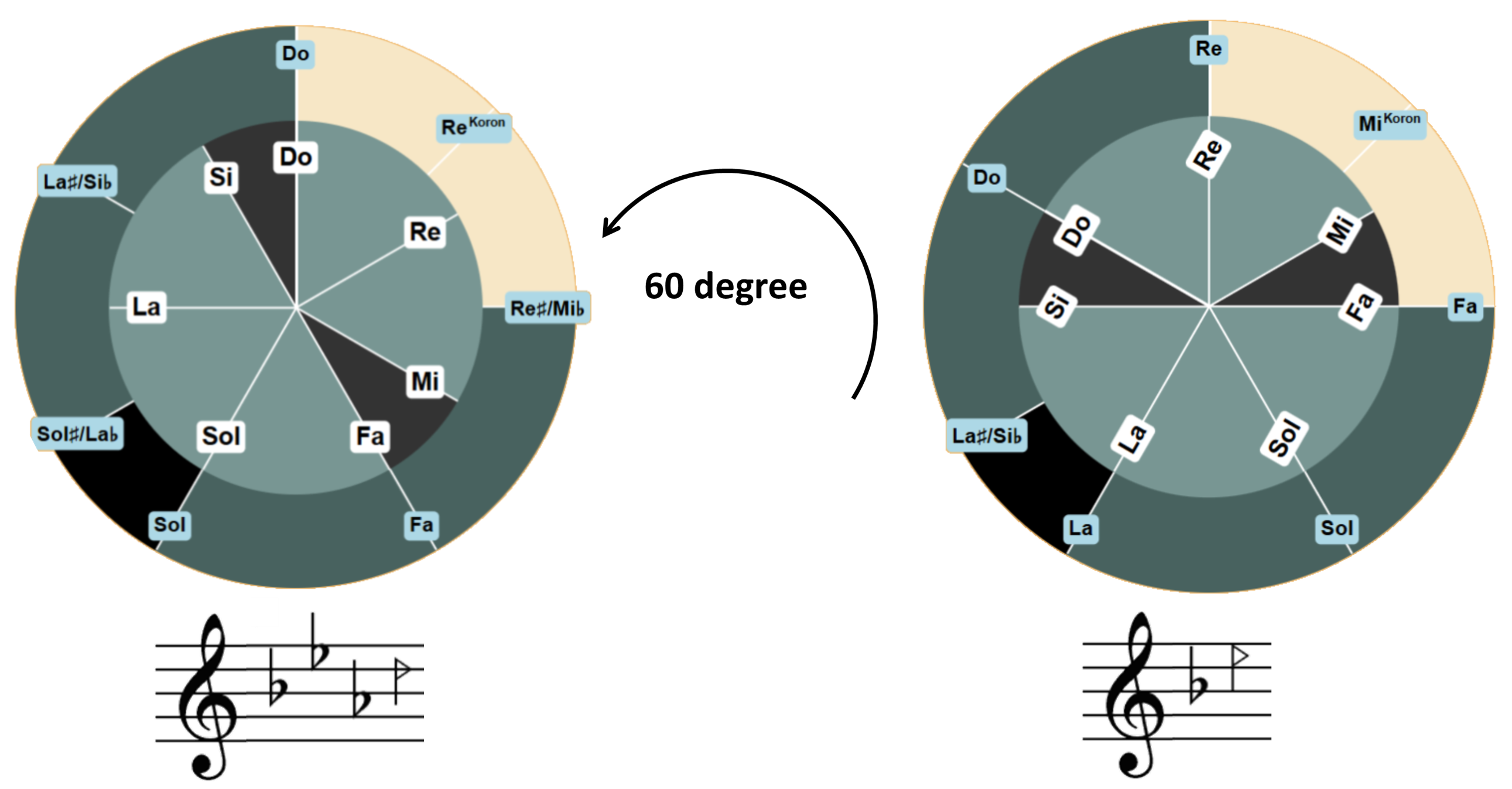
For example, if the reference note is C (do), rotating the diatonic circle by 60° changes it to D (ré). The interval pattern stays the same, as do the scale degrees associated with any assigned shahed or finalis.
Notation and accidentals
Tap the notation card to enlarge the staff. Its accidentals are derived from the approximate pitch model; they are not necessarily a conventional radif key signature.
Dastgah, Avaz and Gusheh
A dastgah is a modal and melodic organization, not simply a list of pitches; an avaz is a closely related modal system, and a gusheh is a melodic unit within the tradition. The app uses pitch-collection models as a useful educational representation, not a complete description of a radif performance.
When Shur is selected, open Avazha to explore Abu Ata, Bayat Tork, Afshari and Dashti. The button shows the selected Avaz and the corresponding note in the current transposition. Deselect an Avaz to return to the general Shur context.
Microtones and modal note functions
The app displays Koron and Sori as modeled alterations of −50 and +50 cents. Actual intonation can vary with melodic context, instrument, performer and tradition.
The note at 12 o’clock is the model’s reference note, not automatically its shahed (focal note) or finalis (closing note). Where documented, ★ marks Shahed and ◆ Finalis; some assignments are provisional. Open the Notes explanation for their sources and qualifications.
Three ways to analyze a melody
- Record: open the microphone tool, allow access, wait for readiness, then hold the recording control while singing or playing; release it to finish.
- Upload: open Analyze Track and choose a supported recording from your device.
- Try an example: use the built-in Jane Oshagh sample to explore the results without recording first.
Read the result
The analyzer estimates a predominant melodic line, compares the detected pitches with the scale models and proposes ranked scale and tonic candidates. The leading match is not necessarily the correct musical interpretation. Compare alternatives when scores are close, and select a different candidate to update the circle.
Playback can show the original recording or a simplified melody. Detected notes and the radial spectrum are synchronized with the circle while audio plays. Passing notes and ornaments may receive different analytical weights from more stable notes.
What gives better results?
Start with a clear, melody-dominant recording and limit accompaniment, percussion and background noise where possible. In dense ensembles, the extracted line may follow a harmonic or another instrument. The output is a best-match educational analysis, not definitive Dastgah or Gusheh recognition.
Recordings and uploaded audio are analyzed locally in your browser. Read the audio-analysis methodology.
Chromatic tuner
- Open Tuner and grant microphone permission when prompted.
- Play or sing one steady note; read its nearest chromatic pitch and the displayed frequency in Hz.
- Use the meter to see whether the pitch is above or below its target. A difference of 100 cents equals one equal-tempered semitone.
- Tap the A4 reference-frequency value to calibrate the tuner if needed. The Auto control switches between automatic detection and manual note selection.
Playback on the Scales page
Play Scale sounds the pitch model currently displayed on the circles. Following analysis, compare the original audio with the simplified monophonic melody to check whether the tracker followed the intended musical line. Use the playback controls to pause, stop or seek when available.
The tuner’s chromatic pitches and frequency measurements are not, by themselves, labels for traditional Dastgah intonation.
Go deeper
These materials document the numerical models, terminology, method assumptions and supporting sources. They supplement the practical instructions above without claiming that a scale model fully defines a performance tradition.
- Official documentation Wiki (English and Persian)
- Persian Music Theory Reference
- Dastgah and Avaz
- Koron, Sori and Microtones
- Terminology and glossary
- Visualization methodology
- Audio-analysis methodology
- Published pitch-model dataset
- Sources and provenance
Model limitations include variable intonation, changing melodic emphasis, phrase structure, modulation, and the distinction between a modeled pitch collection and an identified Dastgah or Gusheh.
Further reading
For the background to the scale models and their visual representation, see the project article:
Scope and scientific limitations
The circular diagrams show selected pitch collections from Persian classical music. They do not represent every melodic feature of a dastgah or gusheh. A pitch collection is an educational representation; modal identity also involves melodic hierarchy, shahed, finalis, characteristic phrases, modulation, and performance context.
Bienvenue dans Persian Music Scales !
Découvrez les gammes de la musique persane grâce aux cercles interactifs : explorez intervalles et micro-intervalles, transposez et écoutez les modèles, et essayez l’accordeur et l’analyse audio avec votre propre musique.
Commencez par la première leçon déjà ouverte, ou choisissez un autre thème pour avancer à votre rythme.
Pour commencer
- Ouvrez Gammes et sélectionnez Šur ou une autre gamme proposée.
- Observez les hauteurs sur les deux cercles liés ; tournez le cercle diatonique pour transposer le modèle.
- Utilisez Jouer la gamme pour écouter les notes, ou ouvrez l’Accordeur pour vérifier une hauteur.
- Pour comparer un enregistrement aux modèles de gammes, ouvrez le microphone ou la fonction d’analyse de piste.
Navigation et installation
Le menu inférieur permet de passer entre Gammes, Accordeur, Guide et À propos. Sélectionnez EN, FR ou فارسی dans l’en-tête : ce choix reste actif d’une rubrique à l’autre.
Sur téléphone, l’invitation à l’installation explique la procédure d’ajout à l’écran d’accueil ou affiche la demande du navigateur lorsqu’elle est disponible. Sur ordinateur, cherchez l’icône d’installation dans la barre d’adresse ou dans le menu du navigateur.
Explorer les cercles musicaux
Lire les deux cercles
Le schéma comporte deux cercles liés :
- Cercle diatonique : il présente les notes diatoniques de référence. En le faisant tourner, on transpose le modèle sans modifier sa structure intervallique.
- Cercle des gammes persanes : il montre les degrés et les intervalles du modèle choisi. La note de référence n’est pas nécessairement le šāhed ni la note finale du dastgāh.
Note de référence et fonctions des degrés
La note située à 12 heures sert de référence au modèle affiché. Elle ne correspond pas forcément au šāhed (note-pôle) ni à la note finale, ou finalis.
- Repérez la note en haut du cercle des gammes persanes.
- C’est la note de référence du schéma affiché.
- Faites tourner le cercle diatonique pour changer de note de référence. Lorsqu’une fonction modale est documentée, ★ indique le šāhed et ◆ la note finale. Vous pouvez afficher ou masquer ces signes. La rubrique « À propos de ces notes » présente les sources, les attributions provisoires et leurs limites. Si aucun signe n’apparaît, la fonction n’a pas encore été attribuée dans ce modèle ; la note elle-même n’est pas absente.
Exemple
Par exemple, avec do (C) comme note de référence, une rotation de 60° la remplace par ré (D). Les intervalles et les degrés associés aux éventuels signes de šāhed et de note finale restent inchangés.
Notation et altérations
Touchez la carte de notation pour agrandir la portée. Les altérations sont calculées d’après le modèle de hauteurs et ne constituent pas nécessairement une armure traditionnelle du radif.
Dastgāh, āvāz et guše
Un dastgāh désigne une organisation modale et mélodique, pas une simple liste de hauteurs. Un āvāz est un système modal apparenté, et un guše une unité mélodique de la tradition. L’application présente des collections de hauteurs à des fins pédagogiques, non une transcription complète du radif.
Lorsque Šur est sélectionné, ouvrez Avazha pour découvrir Abu Ata, Bayat Tork, Afshari et Dashti. Le bouton affiche l’āvāz choisi et la note correspondante après transposition. Désélectionnez-le pour revenir au contexte général de Šur.
Micro-intervalles et fonctions modales
Dans ce modèle, koron et sori désignent des altérations de −50 et +50 cents. L’intonation réelle varie selon le contexte mélodique, l’instrument, l’interprète et la tradition.
La note à 12 heures est la référence du modèle, pas nécessairement le šāhed (note-pôle) ni la note finale. Lorsque leur attribution est documentée, ★ indique le šāhed et ◆ la note finale ; certaines attributions restent provisoires. La rubrique d’explication des notes précise les sources et les limites.
Trois possibilités
- Enregistrer : ouvrez le microphone, autorisez l’accès, attendez qu’il soit prêt, maintenez la commande pendant que vous chantez ou jouez puis relâchez-la.
- Importer : ouvrez l’analyseur de piste et choisissez un enregistrement dans un format pris en charge.
- Exemple : lancez l’extrait Jane Oshagh intégré pour découvrir les résultats sans enregistrer.
Interpréter les résultats
L’analyseur estime la ligne mélodique dominante et propose plusieurs gammes et notes de référence candidates. Le premier résultat n’est pas nécessairement le meilleur au sens musicologique. Comparez les candidats proches et choisissez-en un autre pour modifier l’affichage du cercle.
La lecture synchronise les notes détectées et le spectre radial avec le cercle. La mélodie simplifiée permet de vérifier la ligne suivie ; les notes de passage et ornements n’ont pas toujours le même poids que les notes stables.
Pour améliorer l’analyse
Préférez un enregistrement où la mélodie domine, avec peu d’accompagnement, de percussions ou de bruit. Dans les mélanges denses, l’algorithme peut suivre une harmonique ou un autre instrument. Le résultat reste une estimation pédagogique, pas une identification définitive d’un dastgāh ou d’un guše.
L’audio est analysé localement dans le navigateur. Méthodologie de l’analyse audio.
Accordeur chromatique
- Ouvrez l’Accordeur et autorisez l’accès au microphone.
- Chantez ou jouez une note stable ; lisez sa hauteur chromatique et sa fréquence en Hz.
- Observez l’écart indiqué par le cadran : 100 cents correspondent à un demi-ton du tempérament égal.
- Touchez la valeur de référence A4 (la 4) pour l’ajuster. La commande Auto permet de basculer entre détection automatique et sélection manuelle.
Écoute des modèles
La commande de lecture sur la page Gammes fait entendre le modèle actuellement affiché. Après une analyse, comparez l’enregistrement original et la mélodie monophonique simplifiée afin de contrôler le suivi mélodique. Les commandes de lecture permettent de faire pause, arrêter ou avancer lorsqu’elles sont disponibles.
Les hauteurs chromatiques et mesures fréquentielles ne constituent pas à elles seules une classification traditionnelle de l’intonation des dastgāh.
Pour approfondir
Les pages ci-dessous présentent les modèles numériques, la terminologie, la méthodologie et les sources. Elles complètent le guide pratique sans réduire la tradition à une gamme.
- Wiki officiel (anglais et persan)
- Références théoriques sur la musique persane
- Dastgāh et āvāz
- Koron, sori et micro-intervalles
- Terminologie et glossaire
- Méthodologie de visualisation
- Méthodologie de l’analyse audio
- Jeu de données des modèles
- Sources et provenance
Les limites incluent les variations d’intonation, la hiérarchie mélodique, les phrases caractéristiques, les modulations et la différence entre collection de hauteurs et identité modale.
Pour aller plus loin
L’article du projet présente les modèles et les principes de visualisation plus en détail :
Portée et limites scientifiques
Les diagrammes présentent certaines collections de hauteurs de la musique classique persane ; ils ne représentent pas toutes les caractéristiques mélodiques d’un dastgāh ou d’un guše. Une collection de hauteurs est un modèle pédagogique : l’identité modale dépend aussi de la hiérarchie mélodique, du šāhed, de la note finale, des phrases caractéristiques, des modulations et du contexte d’interprétation.
به راهنمای گامهای موسیقی ایرانی خوش آمدید!
در این راهنما با امکانات تعاملی برنامه آشنا میشوید؛ از شناخت و انتقال گامهای موسیقی ایرانی و بررسی فواصل و ریزپردهها گرفته تا شنیدن گامها، استفاده از تیونر و تحلیل ملودیها و قطعات موسیقی.
برای شروع، درس نخست را که باز است دنبال کنید یا یکی از موضوعهای دیگر را انتخاب کنید و امکانات برنامه را گامبهگام کشف کنید.
گامهای نخست
- بخش گامها را باز کنید و شور یا یکی دیگر از گامهای موجود را انتخاب کنید.
- نتهای دو دایرهٔ مرتبط را بررسی کنید؛ با چرخاندن دایرهٔ دیاتونیک، مدل انتخابی را به نت مرجع دیگری انتقال دهید.
- برای شنیدن نتها از دکمهٔ پخش گام استفاده کنید یا برای بررسی کوک به تیونر بروید.
- برای مقایسهٔ یک ملودی ضبطشده با مدلهای گام، ابزار میکروفون یا تحلیل قطعه را باز کنید.
جابهجایی میان بخشها و نصب
منوی پایین صفحه شامل گامها، تیونر، راهنما و درباره است. از بالای صفحه زبان EN، FR یا فارسی را انتخاب کنید؛ این انتخاب در بخشهای دیگر هم حفظ میشود.
در مرورگر تلفن، راهنمای نصب میتواند روش افزودن برنامه به صفحهٔ اصلی یا پنجرهٔ نصب مرورگر را نشان دهد. در مرورگرهای سازگار رایانه، نماد نصب در نوار آدرس یا منوی مرورگر قرار دارد.
آشنایی با دایرههای موسیقایی
شیوهٔ استفاده
در این نمایش دو دایره به هم وابستهاند:
-
دایره دیاتونیک: نتهای مرجع دیاتونیک را نشان میدهد. با چرخاندن این دایره میتوان گام را انتقال داد، بیآنکه ترتیب فاصلههای آن تغییر کند.
-
دایره گامهای ایرانی: درجات و فاصلههای مدل انتخابشده را نشان میدهد. نت مرجعِ بالای دایره لزوماً شاهد یا نت پایانی دستگاه نیست.
نت مرجع و نقش نتها
نتِ موقعیت ساعت ۱۲، مبنای نمایش گام است. این نت لزوماً شاهد، یعنی یکی از نتهای محوریِ ملودی، یا نت پایانی نیست.
- نتِ بالای دایرهٔ گامهای ایرانی را پیدا کنید.
- این نت مبنای نمایش فعلی است.
- برای تغییر نت مرجع، دایرهٔ دیاتونیک را بچرخانید. هرجا نقش یک نت بر اساس منبع مشخص شده باشد، ★ شاهد و ◆ نت پایانی را نشان میدهد. میتوانید این علامتها را نمایش دهید یا پنهان کنید. در بخش «دربارهٔ این نتها» منابع، مواردِ نیازمند بررسی بیشتر و محدودیتها توضیح داده شدهاند. اگر علامتی نمیبینید، یعنی نقش آن نت در مدل فعلی تعیین نشده است، نه اینکه آن نت وجود ندارد.
مثال
برای مثال، اگر نت مرجع «دو» باشد، با چرخاندن دایرهٔ دیاتونیک به اندازهٔ ۶۰ درجه، نت مرجع به «رِ» تغییر میکند. فاصلههای گام و درجههایی که نشانگر شاهد یا نت پایانی دارند، نسبت به یکدیگر ثابت میمانند.
سرکلید و نمادهای تغییر
برای نمایش بزرگتر نتنویسی روی کارت سرکلید بزنید. نشانههای نمایشدادهشده بر پایهٔ مدل تقریبی درجات صوتی محاسبه شدهاند و لزوماً سرکلید متعارف ردیف نیستند.
دستگاه، آواز و گوشه
دستگاه فقط مجموعهای از نتها نیست، بلکه سازمانی مُدال و ملودیک با نقشهای متفاوت نغمهها و الگوهای اجرایی است. آواز از شاخهها یا نظامهای مُدال مرتبط به شمار میرود و گوشه واحدی ملودیک در سنت ردیف است. مدلهای درجات صوتی این برنامه برای آموزش و مقایسهاند و جانشین توصیف کامل اجرای ردیف نیستند.
با انتخاب شور، بخش آوازها را باز کنید تا ابوعطا، بیات ترک، افشاری و دشتی را بررسی کنید. پس از انتخاب هر آواز، نام آن و نت مربوط به انتقال فعلی روی دکمه نمایش داده میشود. با لغو انتخاب، به زمینهٔ عمومی شور برمیگردید.
ریزفاصلهها و نقش نغمهها
در مدل محاسباتی برنامه، کرن و سُری بهترتیب تغییراتی برابر با ۵۰ سنت پایینتر و بالاتر از نت مرجع را نشان میدهند. فاصلههای اجرایی موسیقی ایرانی الزاماً ثابت نیستند و با بافت ملودیک، ساز، نوازنده و سنت اجرایی تغییر میکنند.
نتِ موقعیت ساعت ۱۲ نت مرجع مدل است و لزوماً شاهد یا نت پایانی نیست. هرجا بر اساس منبع تعیین شده باشد، ★ نشانهٔ شاهد و ◆ نشانهٔ نت پایانی است. برخی تعیینها موقتاند و در توضیحات نقش نتها میتوانید منابع و محدودیتها را ببینید.
سه راه برای تحلیل ملودی
- ضبط: ابزار میکروفون را باز کنید، اجازهٔ دسترسی بدهید، منتظر آمادهشدن بمانید، هنگام خواندن یا نواختن دکمهٔ ضبط را نگه دارید و برای پایان رها کنید.
- بارگذاری: بخش تحلیل قطعه را باز کنید و فایل صوتی با قالب پشتیبانیشده را انتخاب کنید.
- نمونهٔ آماده: از نمونهٔ «جان عشاق» برای آشنایی با نتایج، بدون ضبط صدای تازه، استفاده کنید.
خواندن نتیجه
تحلیلگر تلاش میکند خط ملودی غالب را استخراج کند و گامها و نتهای مرجع احتمالی را بهترتیب پیشنهاد دهد. گزینهٔ اول لزوماً بهترین تفسیر موسیقایی نیست. اگر نتایج نزدیکاند، آنها را مقایسه کنید؛ با انتخاب گزینهای دیگر، دایره نیز مطابق آن تغییر میکند.
هنگام پخش، نتهای تشخیصدادهشده و نمایش طیف شعاعی با دایره هماهنگ میشوند. نسخهٔ سادهشدهٔ ملودی کمک میکند مسیر استخراجشده را بررسی کنید. نتهای گذر و تزیینها در ارزیابی الزاماً هموزن نتهای پایدار نیستند.
بهبود کیفیت تحلیل
بهتر است صدایی روشن و ملودیمحور با همراهی و نویز کمتر ضبط شود. در موسیقی چندصدایی، الگوریتم ممکن است یک هارمونیک یا ساز دیگری را دنبال کند. نتیجه یک تطبیق آموزشی و احتمالی است، نه تشخیص قطعی دستگاه یا گوشه.
صداهای ضبط یا بارگذاریشده در مرورگر خودتان تحلیل میشوند. روششناسی تحلیل صوت.
تیونر کروماتیک
- تیونر را باز کنید و در صورت درخواست، دسترسی به میکروفون را مجاز کنید.
- یک نت پایدار بخوانید یا بنوازید و نزدیکترین نت کروماتیک و فرکانس آن را با واحد هرتز ببینید.
- به نشانگر کوک توجه کنید تا بالاتر یا پایینتر بودن فرکانس را دریابید؛ هر ۱۰۰ سنت برابر یک نیمپردهٔ تعدیل مساوی است.
- در صورت نیاز با لمس مقدار A4 فرکانس مرجع را تغییر دهید. گزینهٔ خودکار امکان جابهجایی میان تشخیص خودکار و انتخاب دستی نت را فراهم میکند.
پخش گام و ملودی
دکمهٔ پخش گام، نتهای مدل فعلی دایره را مینوازد. پس از تحلیل صوت میتوانید صدای اصلی را با ملودی تکصدایی سادهشده مقایسه کنید تا روشن شود تحلیلگر چه خطی را دنبال کرده است. در صورت موجودبودن، از توقف موقت، توقف و جابهجایی روی خط زمان استفاده کنید.
نتهای کروماتیک و اندازهگیری فرکانس، بهتنهایی بیانگر هویت دستگاهی یا ظرافتهای کوک اجرایی موسیقی ایرانی نیستند.
مطالعهٔ بیشتر
صفحات زیر مدلهای عددی، اصطلاحات، روششناسی و منابع را توضیح میدهند. این مطالب مکمل راهنمای عملیاند و دستگاه را به یک گام عددی تقلیل نمیدهند.
- ویکی رسمی برنامه (فارسی و انگلیسی)
- منابع نظری موسیقی دستگاهی ایران
- دستگاه و آواز
- کرن، سُری و ریزفاصلهها
- اصطلاحات موسیقی ایرانی
- روششناسی نمایش گامها
- روششناسی تحلیل صوت
- مجموعهدادهٔ مدلها
- منابع و خاستگاه مدلها
محدودیتهای مدل شامل تغییرپذیری کوک، سلسلهمراتب ملودیک، جملههای شاخص، مدگردی و تفاوت میان مجموعهٔ درجات صوتی و هویت مُدال است.
مطالعهٔ بیشتر
برای توضیح بیشتر دربارهٔ مدلها و شیوهٔ نمایش آنها، مقالهٔ پروژه را بخوانید:
دامنهٔ کاربرد و محدودیتهای علمی
شکلها مجموعههایی از نتها و فاصلههای بهکاررفته در موسیقی دستگاهی ایران را نشان میدهند، اما تمام ویژگیهای ملودیک دستگاه یا گوشه را در بر نمیگیرند. مجموعهٔ درجات صوتی ابزاری آموزشی برای نمایش و مقایسه است؛ هویت مُدال میتواند به سلسلهمراتب ملودیک، شاهد، نت پایانی، جملههای شاخص، مدگردی و بافت اجرای موسیقی وابسته باشد.